03 Tick and TickBitmap
Overview
In Uniswap V3, the number of possible tick values is very large (about 1.7 million), but the number of ticks actually used is very small and sparse. Therefore, all ticks cannot be stored directly. Instead, an efficient data structure is needed to quickly determine whether a tick has been initialized and to quickly find the next initialized tick. For this reason, tickBitmap is introduced.
1. Data structure of TickBitmap
The essence of tickBitmap is:
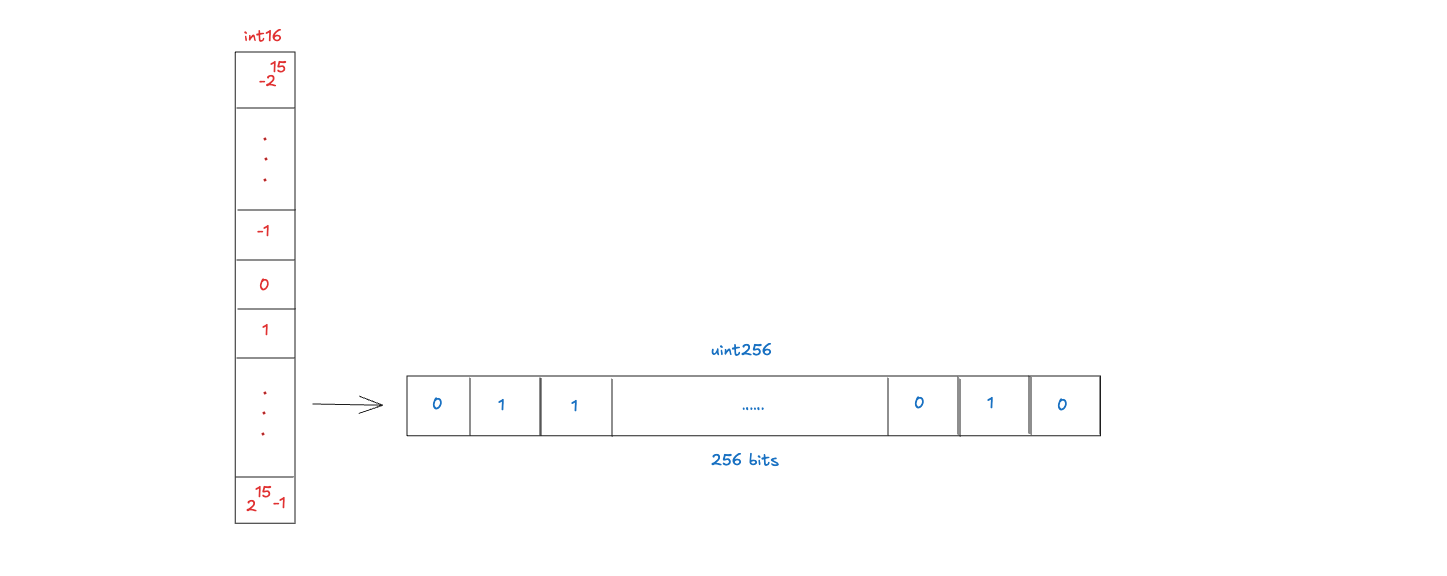
meaning:
- key (int16): represents a 256 tick block number (word)
- value (
uint256): indicates whether any of the 256 ticks in this block are initialized
Values:
1: the tick has been initialized0: not initialized
For example:
When `tickSpacing = 1`:

word = 0   → ticks [0 ~ 255]
word = 1   → ticks [256 ~ 511]
word = -1  → ticks [-256 ~ -1]
A tick is split into two parts:
word position: indicates whichuint256word it falls inbit position: indicates the bit offset within that word
That is:
- wordPos: int16 is used to locate the 256-bit block
tickBitmap[wordPos]
- bitPos: uint8 is used to locate the number in this block
tickBitmap[wordPos] & (1 << bitPos)
Correspondence:
mapping(int16 => uint256) public tickBitmap;
Because one uint256 equals 256 bits, a single uint256 can be used to store the initialization status of 256 ticks. In this way, bit operations can be used to quickly find whether the current tick is initialized, the nearest initialized tick on the left, or the nearest initialized tick on the right.
2. How Tick is mapped to Bitmap (core)
2.1 TickSpacing and effective Tick
The pool does not use all ticks. It only allows integer multiples of tickSpacing as valid ticks. For example:
- When
tickSpacing = 1, all ticks may be valid - When
tickSpacing = 10, only these ticks..., -20, -10, 0, 10, 20,...may be initialized - When
tickSpacing = 60, only these ticks..., -120, -60, 0, 60, 120,...may be initialized
Therefore, what the bitmap actually records is not "whether the original tick is initialized or not", but the compressed value, usually:
compressed = tick / tickSpacing
2.3 Split wordPos and bitPos
Then split it into two parts wordPos and bitPos:
wordPostakes the high 16 bitsbitPostakes the lower 8 bits
That is to split a compressed int24 into:
[High 16 bits | Low 8 bits]

int16 wordPos = int16(compressed >> 8);
uint8 bitPos = uint8(uint24(compressed % 256));
And because Solidity’s division truncates negative numbers toward 0, bitmap requires a rounding-down grouping method. For example:
tick = -1
tickSpacing = 10

-1 / 10 = 0

// Solidity truncates towards 0
But from the perspective of bitmap grouping, -1 should belong to the group [-10, -1], not the group [0, 9]. Therefore, in V3, additional corrections will be made for negative numbers that are not divisible:
if (tick < 0 && tick % tickSpacing != 0) compressed--;
This can ensure that negative ticks are divided into the correct word / bit range.
2.4 Example: tick = -200697
int24 tick = -200697

tickSpacing = 1

compressed = -200697
Because a word = 256 bits, compressed tick can be regarded as:
- High 16 bits: determine which word it belongs to
- Lower 8 bits: determine which bit it is in the word
In other words, wordPos and bitPos in the source code are essentially taking the high and low bits of the compressed tick.
Intuitively, it can be roughly understood as:
compressed ≈ wordPos * 256 + bitPos
But this is not a strict mathematical decomposition. Especially in the case of negative numbers, it should be understood as splitting the high and low bits of the compressed tick.
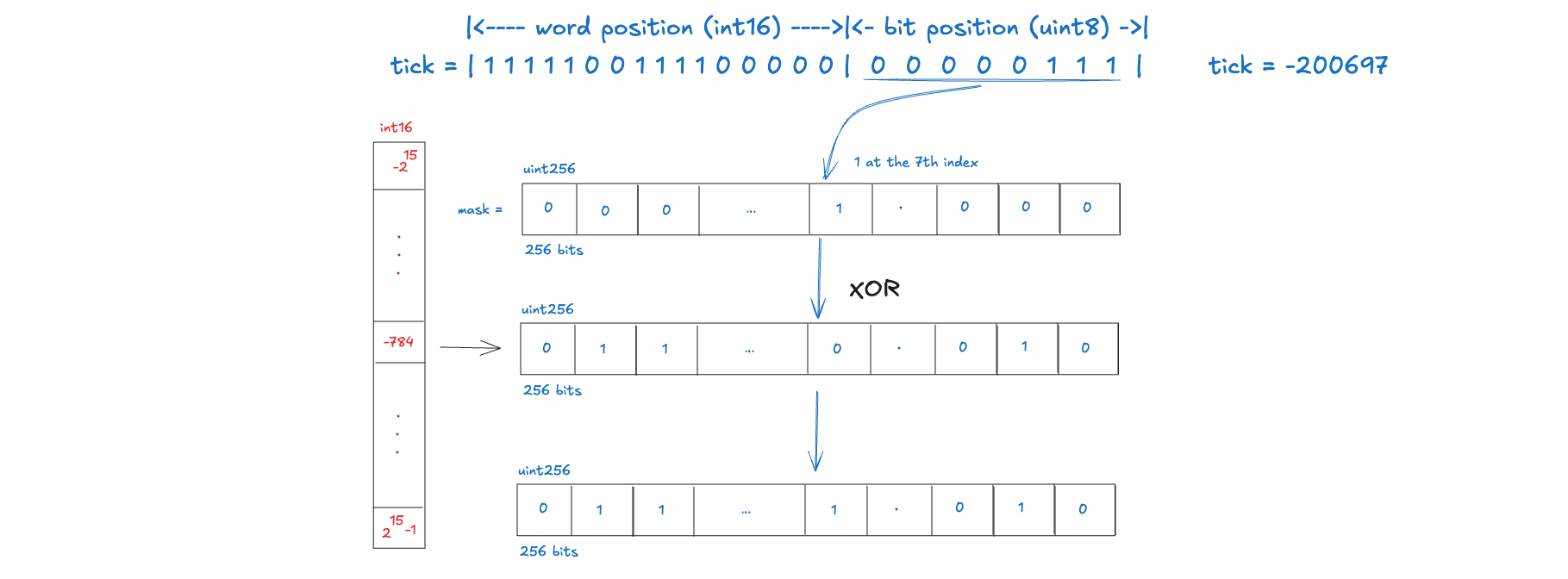
wordPos = compressed >> 8  = -784
bitPos = uint8(uint24(compressed)) = 7

	   |<---- word position (int16) ---->|<- bit position (uint8) ->|
tick = | 1 1 1 1 1 0 0 1 1 1 1 0 0 0 0 0 |  0  0  0  0  0  1  1  1  |
	   | = -784                          | = 7                      |

# Position bitmap

# wordPos = -784 → corresponds to tickBitmap[-784]

# The word is a uint256 with a total of 256 bits

Bit 7 in tickBitmap[-784] is set to 1
4. How to write Tick to Bitmap
We mentioned earlier about how to calculate compressed, including ensuring that it can be divided into the correct word / bit interval even in the case of negative numbers, and how to position word and bit. Then, the next step is to construct the mask and then write it to the bitmap, that is:
uint256 mask = 1 << bitPos;
tickBitmap[wordPos] |= mask;

tickBitmap[-784] |= (1 << 7); // tick = -200697 has been initialized and stored in the bitmap
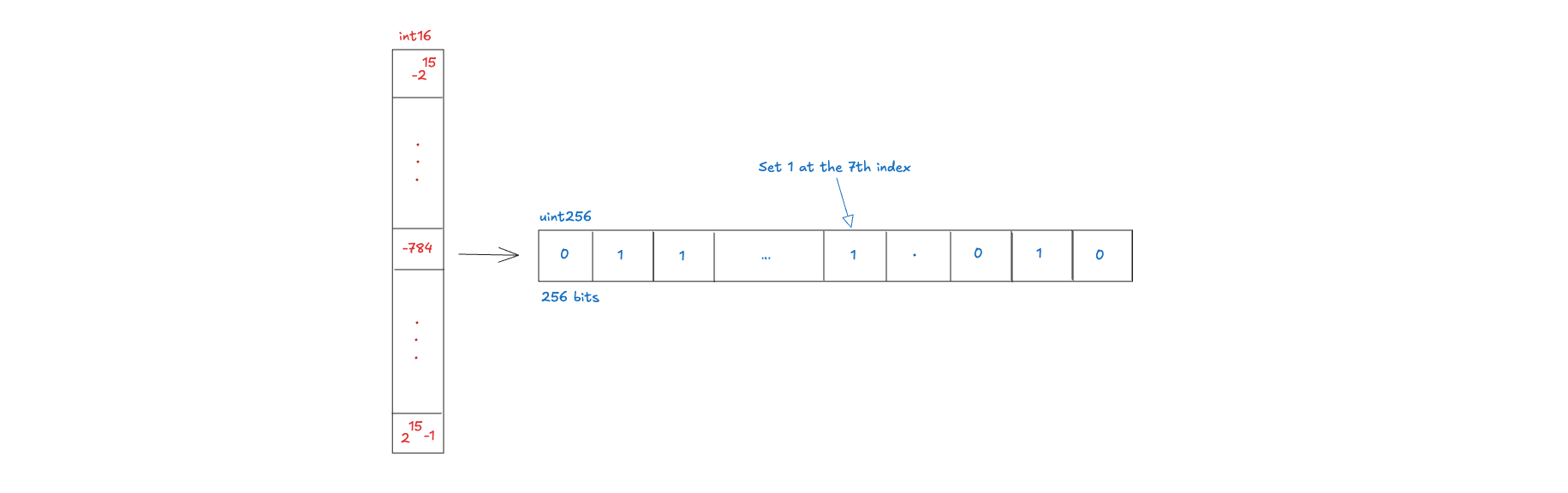
It should be noted here that not every tick can be written to the TickBitmap. Only ticks that satisfy tick % tickSpacing == 0 are valid initializable ticks.
Similarly, if you want to determine whether tick = -200697 is initialized from the bitmap, you need to find the 7th bit in the uint256 tickBitmap[-784] through bit operations and check whether the 7th bit is 1.
6. Tick flipTick
In V3, when the initialization status of a certain tick changes, flipTick needs to be used to switch the initialization status of a certain tick.
Flip is triggered only in the following two situations:
- When a tick is initialized for the first time (liquidity changes from 0 → non-0)
- When a tick is completely cleared (liquidity changes from non-zero to 0)
In other words, it flips only when the state changes between 0 and non-zero. It is implemented with XOR because XOR can switch between 0 and 1 without checking the current state again, which saves gas.
7. How to find the next initialized Tick
In Uniswap V3, TickBitmap is not only used to record whether a tick is initialized, but more importantly, it is used to quickly find the next initialized tick.
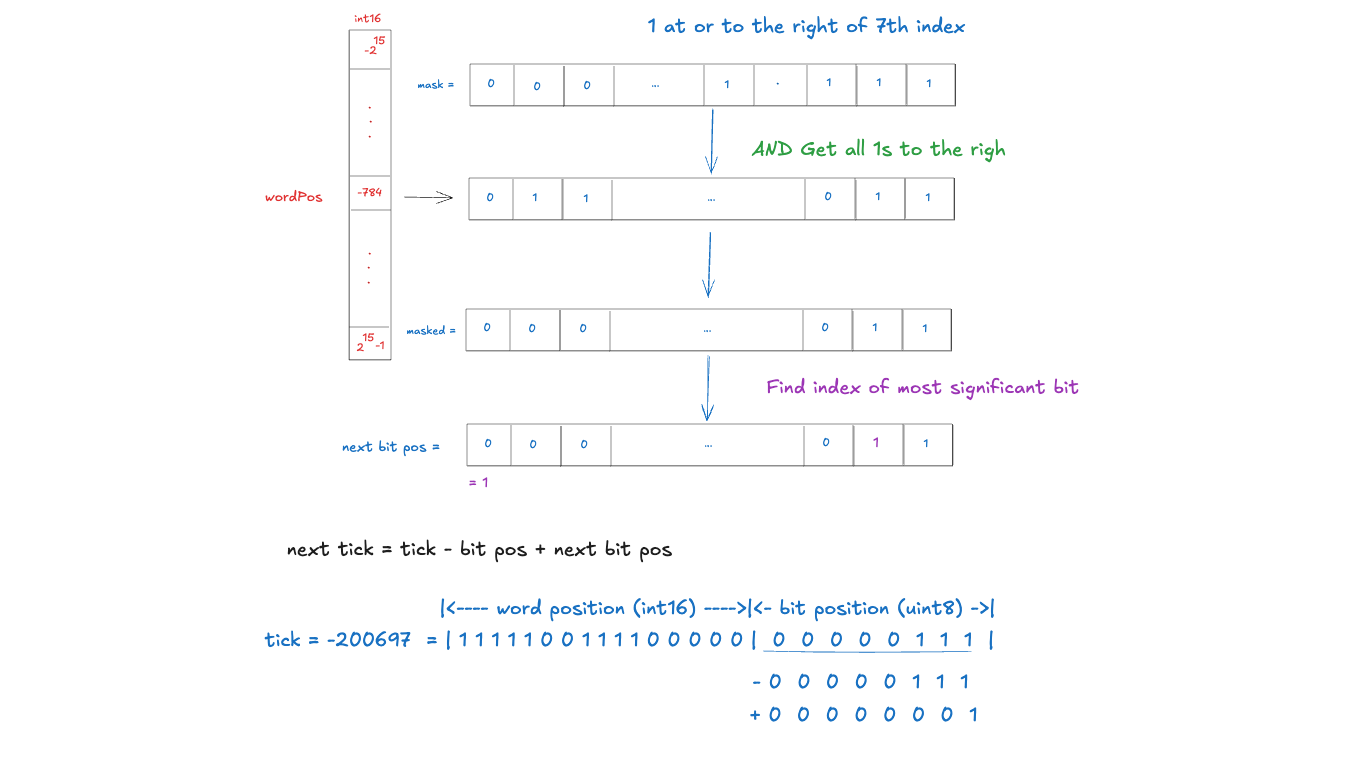
7.1 Case 1: Find
In the word where the current tick is located, find the nearest initialized tick on the right
Step 1: Locate the current tick
int24 compressed = tick / tickSpacing;

if (tick < 0 && tick % tickSpacing != 0) {
    compressed--;
}

int16 wordPos = int16(compressed >> 8);
uint8 bitPos  = uint8(uint24(compressed));
Step 2: Read bitmap
uint256 word = tickBitmap[wordPos];
Step 3: Construct the mask (retain the right bits)
We only care about the current bitPos and all the bits to its right
uint256 mask = ~((1 << bitPos) - 1);
Step 4: Filter bitmap
uint256 masked = word & mask;
Only keep all initialized ticks less than or equal to bitPos
Step 5: Find the nearest 1
-
If
masked != 0, it means that there is an initialized tick on the right side of the current word. At this time, we need to find the nearest 1 on the right. -
If the current word does not have
masked ** 0, it means that there is no initialized tick on the right side of the current word. You need to jump to the next word to continue searching.
wordPos += 1`。
word = tickBitmap[wordPos];
nextBitPos = BitMath.leastSignificantBit(word);
Step 6: Restore tick
int24 nextTick = (compressed - int24(bitPos) + int24(nextBitPos)) * tickSpacing;
7.2 Case 2: Find
In this part, we need to find the next left most recently initialized tick that is greater than the current tick.
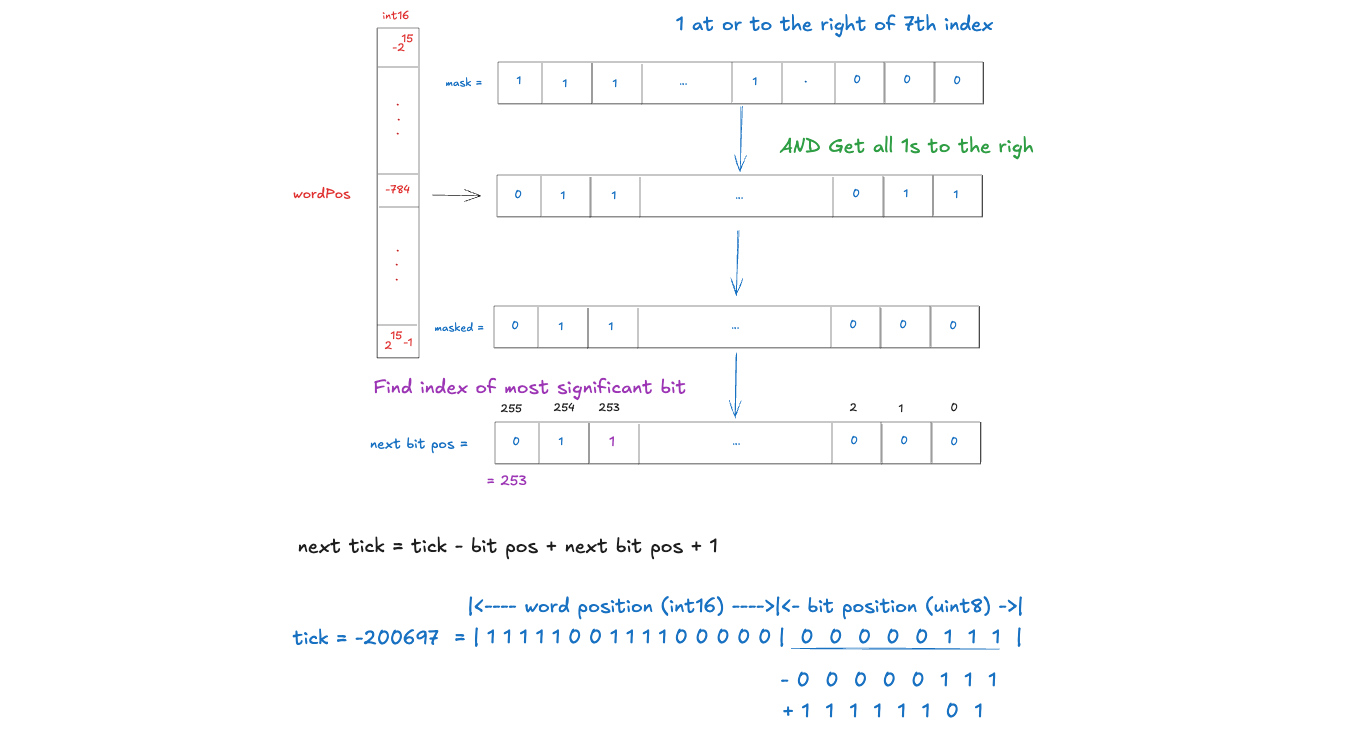
Step 1: Locate the current tick
int24 compressed = tick / tickSpacing;

if (tick < 0 && tick % tickSpacing != 0) {
    compressed--;
}

int16 wordPos = int16(compressed >> 8);
uint8 bitPos  = uint8(uint24(compressed));
Step 2: Read bitmap
uint256 word = tickBitmap[wordPos];
Step 3: Construct the mask (retain the left bits)
We only care about the current bitPos and all the bits to its right
uint256 mask = ~((1 << (bitPos + 1)) - 1);
Step 4: Filter bitmap
uint256 masked = word & mask;
Only keep all initialized bits greater than bitPos.
Step 5: Find the nearest 1
-
If
masked != 0, it means that there is an initialized tick on the left side of the current word. At this time, we need to find the nearest 1 on the left. -
If the current word does not have
masked == 0, it means that there is no initialized tick on the left side of the current word. You need to jump to the next word to continue searching.
wordPos -= 1;
word = tickBitmap[wordPos];
nextBitPos = BitMath.leastSignificantBit(word);
Step 6: Restore tick
int24 nextTick = (compressed - int24(bitPos) + int24(nextBitPos)) * tickSpacing;