04 Swap Price Progression
Overview
In the previous article, we established the complete static structure of Uniswap V3:
- Liquidity is defined as a virtual curve within the interval
- Prices are discretely indexed by tick
- Use sqrtPriceX96 for exact calculations
- And achieve efficient interval search through tickBitmap
These contents answer one question: what is the state of the system at any time? However, the core of a CLMM protocol is not the static state, but how the state changes.
During an actual transaction:
- The user inputs one token
- The pool outputs the other token
- At the same time, the price changes
- The swap may span multiple tick intervals
Therefore, a more fundamental question is: when a swap occurs, how does the price move through liquidity? This chapter systematically analyzes the swap mechanism of Uniswap V3 from the perspective of state change and focuses on answering:
- How does price move within a single tick?
- How to cross ticks when the price hits the boundary?
- How does liquidity change across ticks?
- How can the entire swap process be broken down into a series of partial steps?
Through this chapter, we will unify all the previous mathematical structures and data structures into a dynamic process: swap = continuous price advancement + discrete liquidity changes + a while-loop state machine.
1. Swap within a single Tick: computeSwapStep
In V3, swap is not as simple as "the user inputs a token, and the pool directly spits out another token according to a formula."
More precisely, the essence of swap is:
- Under the current effective liquidity
- The price moves continuously along the local curve corresponding to the current tick
- When the price hits the range boundary, it crosses to the next tick
- At the same time, the global effective liquidity is updated according to
liquidityNet - Then the price continues within the new liquidity range
Therefore, a complete swap is not a single formula calculation, but a process composed of multiple local steps. Each partial step answers the same question:
Given the current liquidity, current price, target price, and remaining input/output amounts, how far can this step push the price at most?
That's exactly what SwapMath.computeSwapStep does.
If a complete swap is regarded as a long path, then computeSwapStep does not process the entire path, but only a partial fragment of it:
- The current price is
sqrtRatioCurrentX96 - The current effective liquidity is
liquidity - The target price of the current step is
sqrtRatioTargetX96 - How many input/outputs the user has yet to complete is
amountRemaining
The goal of the function is:
Under the premise of "not crossing the current step target boundary", calculate how far this step can actually go, and give:
- New price
sqrtRatioNextX96- The input consumed in this step is
amountIn- The output produced by this step is
amountOut- The fee charged in this step is
feeAmount
Therefore, this function is essentially performing a boundary-constrained local price move.
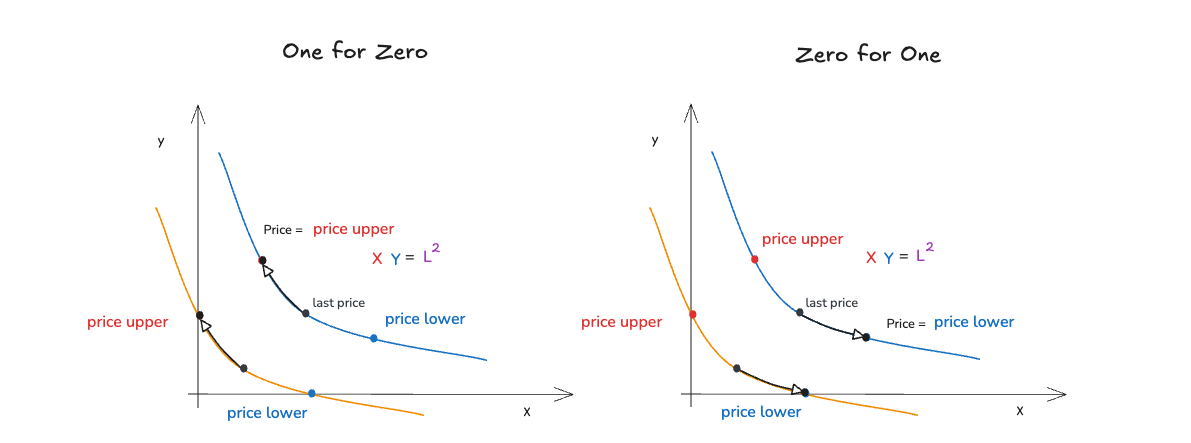
1.1 First determine the direction of price movement
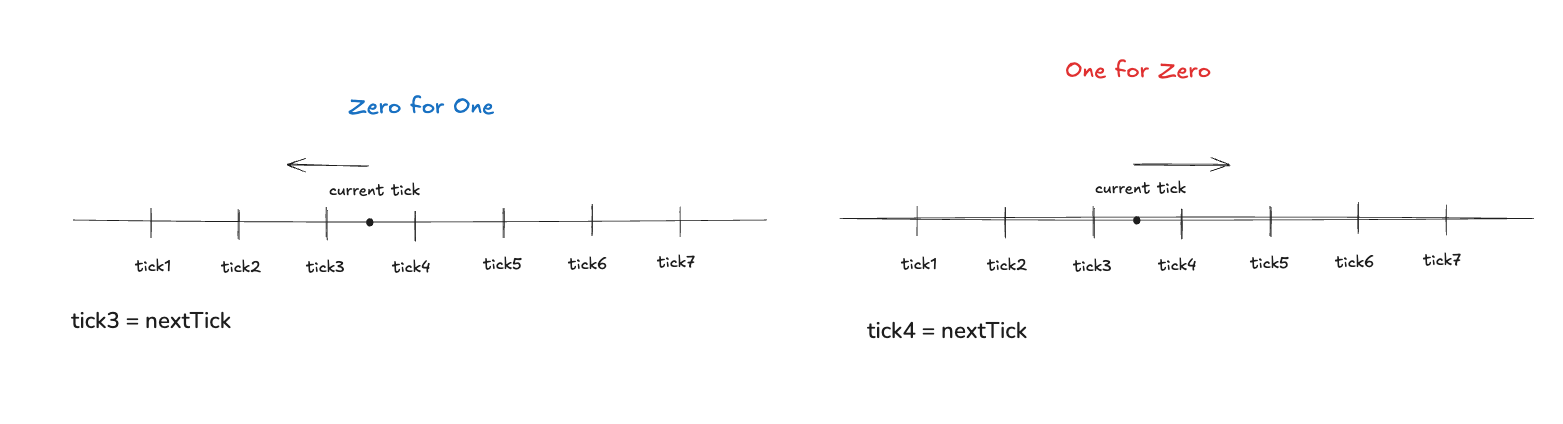
The first thing computeSwapStep does is not to calculate amounts, but to determine whether the price will move left or right in this step.
bool zeroForOne = sqrtRatioCurrentX96 >= sqrtRatioTargetX96;
This means:
- If
zeroForOne = true, the target price is lower and the price moves to the left - If
zeroForOne = false, the target price is higher and the price moves to the right
This is consistent with the previous price representation: sqrtPriceX96 is an accurate on-chain representation of price, and the swap process is essentially the process of sqrtPriceX96 moving on the price axis.
Therefore, zeroForOne does not just represent “token0 → token1”; more importantly, it represents the direction in which the price advances in the current step.
1.2 Determine exact input / exact output
In V3, swap can have two modes:
exactInput: The user specifies the maximum investment amountexactOutput: The user specifies how much he wants to get
The difference between these two models lies not in the different outcome variables, but in whether the system is constrained by the "residual input budget" or the "residual output target" when prices are advanced. Therefore, subsequent calculations will be divided into two sets of paths:
exactIn: Let’s first see how far the input after deducting the fee can push the price.exactOut: First look at the maximum output that can be produced in the current price range
exactIn: First ask "Is the remaining input enough to reach the target price?"
- Deduct the fee first
- Calculate "how many inputs are needed if we reach the target"
- Compare whether the budget is sufficient
- enough: walk to the target
- Not enough: stop midway
In exactIn mode, the code first deducts the available portion of the fee from the user's remaining input:
uint256 amountRemainingLessFee = FullMath.mulDiv(uint256(amountRemaining), 1e6 - feePips, 1e6);
Then calculate how many inputs are theoretically required if this step goes all the way to sqrtRatioTargetX96?
If the price is to the left (zeroForOne), the following is used:
getAmount0Delta(target, current, liquidity, true)
If the price is to the right (oneForZero), the following is used:
getAmount1Delta(current, target, liquidity, true)
The meaning here is to ask: Under the current liquidity, if the price advances from the current point to the target boundary, how much input will be consumed along this local curve?
Then compare it to amountRemainingLessFee:
- If the budget is sufficient: this step can go directly to the target boundary
- If the budget is insufficient: the price can only stop halfway and a new
sqrtRatioNextX96needs to be launched.
Therefore, the core logic of exactIn is to first compare the "budget" with the "cost required to complete the entire section", and then decide whether to reach the border or stop halfway.
exactOut: First ask "What is the maximum output that can be produced in the current interval?"
In exactOut mode, the problem is reversed. At this point, first calculate how much output can be produced at the current step if the price advances all the way to the target boundary?
If the price is to the left (zeroForOne), the following is used:
getAmount1Delta(target, current, liquidity, false)
If the price is to the right (oneForZero), the following is used:
getAmount0Delta(current, target, liquidity, false)
Then compare with the output the user also wants:
- If the current step is enough to cover the remaining output target: the price can directly advance to the target boundary
- If it is not enough: it means that the output target has been met before reaching the boundary. At this time, a new
sqrtRatioNextX96needs to be deduced.
Therefore, the core logic of exactOut is to first compare "how much output can this segment give at most" and "how much output does the user still need", and then decide where the price should stop.
1.3 Recalculate amountIn and amountOut
In the previous judgment, computeSwapStep first calculated an estimate of "how much it would theoretically consume/produce if it reaches the target boundary." Its main function is to determine whether the current remaining quantity is enough to move the price to target.
But once it is discovered that "target cannot be reached, the system will first find the real stop price sqrtRatioNextX96. At this time, the original amount is just the "value under the boundary assumption" and is no longer accurate.
Therefore, the second half of the code will recalculate the actual results of this step: amountIn and amountOut based on the actual sqrtRatioNextX96.
In other words, the first half of the code of the computeSwapStep function is for boundary accessibility judgment, and the second half is for real trading volume settlement, and the roles of these two calculations are different and do not overlap.
Looking further, the logic of recalculating amountIn and amountOut essentially depends on two conditions:
- Whether you have reached the target boundary:
max = (sqrtRatioNextX96 ** sqrtRatioTargetX96) - User mode:
exactInorexactOut
These two conditions are combined to form a total of 4 situations:
Case 1: max && exactIn (reaching boundary + input mode)
amountIn = amountIn
This means:
- The input provided by the user is enough to reach the target
- Already calculated before: "How many inputs are needed to reach the target"
Therefore:
amountInis this value, no need to recalculateamountOutneeds to be recalculated based on the real path (to avoid accuracy errors)
The essence is that the entire interval has been traveled, and the input is the "theoretical value" and can be used directly.
Case 2: max && !exactIn (reaching boundary + output mode)
amountOut = amountOut
This means:
- The current step can only produce so many outputs at most.
- And user demand ≥ this maximum value
Therefore:
amountOutis "the maximum output that can be provided in this range"amountInneeds to be recalculated (because input is derived)
The essence is that this period of liquidity has been drained, and the output is the "limit value" and can be used directly.
Case 3: !max && exactIn (not reaching the boundary + input mode)
amountIn = getAmountDelta(...)
amountOut = getAmountDelta(...)
This means:
- User input is not enough to go to
target - The price stops somewhere in the middle
sqrtRatioNextX96
Therefore:
- The previous "go to target's amountIn" is no longer valid
- Must be recalculated based on real stopping point:
current → sqrtRatioNextX96
Equivalent to the "stop midway" situation, all amounts must be recalculated.
Case 4: !max && !exactIn (not reaching the boundary + output mode)
Same reason:
- What the user wants
outputis already satisfied within the current range - Price stops early
Therefore:
amountOutneeds to be capped (cannot exceed user requirements)amountInmust also be recalculated based on the real price
It is equivalent to output being satisfied halfway, and the price will not go to the boundary.
Final closing under exactOut
So far, we have recalculated amountIn and amountOut for this step based on the real stop price sqrtRatioNextX96.
But it should be noted that in exactOut mode, this amountOut may still "slightly exceed the output that the user really needs."
Therefore, there will be another closing in the source code:
if (!exactIn && amountOut > uint256(-amountRemaining)) {
	amountOut = uint256(-amountRemaining);
}
because:
-
exactIn: The constraint is input → output is the calculation result, there is no "exceeding requirements" -
exactOut: The constraint is output → Must strictly meet "cannot exceed user needs"
Among them, -amountRemaining represents how many outputs the current step user has left to satisfy.
The essence of this cap can be understood as a "hard upper limit protection" for the final output in exactOut mode.
1.4 feeAmount fee calculation
After understanding the recalculation of amountIn and amountOut, we still need to answer a question: Why is feeAmount not determined together with amountIn at the front, but is calculated separately at the end?
On the surface, it seems that fee has been processed once before in the exactIn branch:
uint256 amountRemainingLessFee = FullMath.mulDiv(uint256(amountRemaining), 1e6 - feePips, 1e6);
It looks like "the fee has been processed once before and calculated again at the end", but in fact it is not a repeated calculation, but two different stages:
- The function of the previous
amountRemainingLessFeeis to first estimate "the maximum amount of net input that can be used to drive prices" in theexactInmode. - The
feeAmounthere is the official settlement fee for this step based on the real transaction results.
That is to say:
- The previous step is to determine the path.
- Final settlement is being done here
So the code is done first:
The overall sequence of fee calculations is:
Determine the true stop price first
→ Determine the real amountIn / amountOut
→Finally determine the real feeAmount
In the computeSwapStep function, the code divides the fee calculation into 4 situations:
if (exactIn && sqrtRatioNextX96 != sqrtRatioTargetX96) {
    feeAmount = uint256(amountRemaining) - amountIn;
} else {
    feeAmount = FullMath.mulDivRoundingUp(amountIn, feePips, 1e6 - feePips);
}
Case 1: exactIn && !max
It indicates that it is currently in exact input mode, and this step has not reached target. In other words, the user's current remaining input budget is not enough to push the price to the target boundary.
At this time, amountRemainingLessFee has been calculated before, which means that after deducting the fee, the maximum net input that can truly enter the curve is. Now the real amountIn has been recalculated. Since the current step has not reached the target, it means that this step is not cut off by the boundary, but by the input budget itself, and this step has consumed all the remaining user input amountRemaining.
Therefore, in this scenario, the total input of the current step satisfies:
So directly get:
Case 2: exactIn && max
Indicates that the current input is exact, and this step has successfully reached the target. That is, the user currently has a lot of remaining input, which is enough to support the price from current to target.
At this time, what this step really consumes is only the "part of the input required to reach the target", rather than spending all amountRemaining.
Therefore, we can only derive the corresponding fee for this step based on the actual net input of this step, amountIn, and the fee rate:
Case 3: !exactIn && max
Indicates that the current output is exact, and this step has reached the target. That is, within the current step, even if the price is pushed to the target boundary, the output still does not meet the total user demand, so it must continue to go back.
Therefore, under exactOut, the settlement method of fees must only be:
- First find out how much net input
amountInis really needed to get these outputs - Then based on the rate, deduct the fee part of the gross input from the net input.
That is:
Case 4: !exactIn && !max
This means that the current output is exact, and this step has not reached the target. That is, the output requested by the user is already met halfway through the current range, so the price stops early.
Therefore it must also be used here:
| Situation | Meaning | Fee calculation method | Reason |
|---|---|---|---|
exactIn && !max | The input budget is exhausted first, and the price stops midway | amountRemaining - amountIn | The current step has just exhausted the entire input budget |
exactIn && max | If the input is enough, the price reaches the target | Proportional formula | Only part of the input budget is used and cannot be directly subtracted |
!exactIn && max | exactOut, and go to target | Proportional formula | amountRemaining represents output, not input |
!exactIn && !max | exactOut, and the output has been satisfied midway | Proportional formula | amountRemaining still represents output and cannot participate in fee calculation |
2. Complete Swap: UniswapV3Pool.swap
In the previous section, we have analyzed computeSwapStep, understood how the price advances under fixed liquidity within a single tick, and completed the settlement of amountIn, amountOut and feeAmount in this step.
But a complete swap usually does not occur within a single tick. When the price advances to the boundary of the current range, the protocol still needs to continue to deal with several issues:
- Where is the next boundary tick? -Does it need to span ticks?
- How does liquidity change after crossing?
- Do the remaining inputs/outputs still need to be matched?
Therefore, computeSwapStep is responsible for "single-step advancement", while swap is responsible for "organizing multiple steps into a complete transaction."
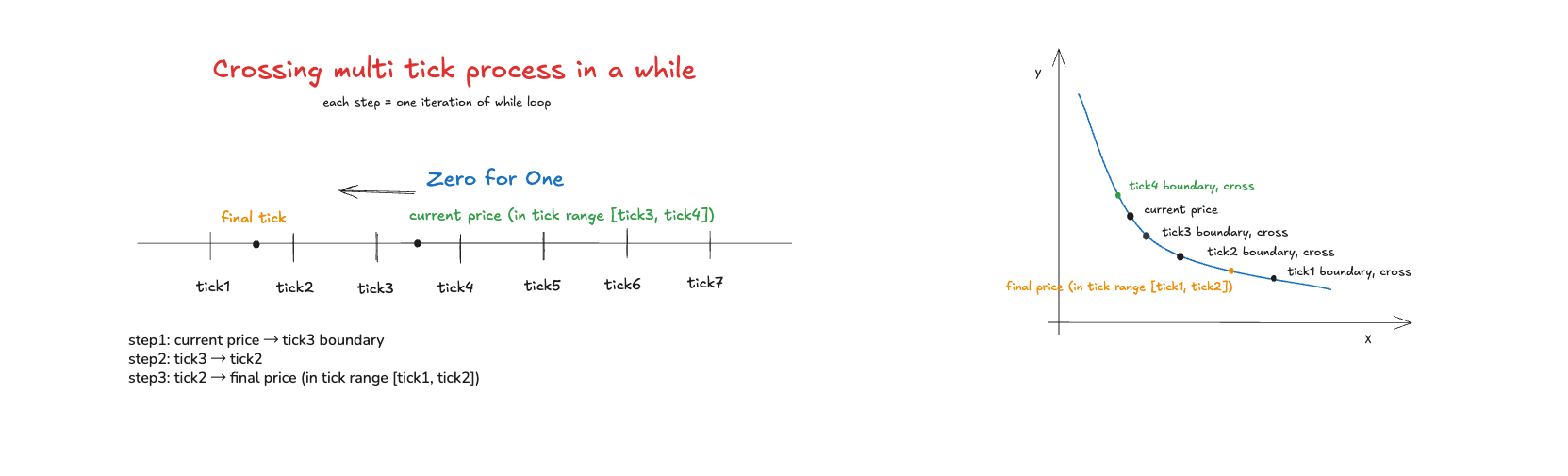
2.1 swap is not a calculation, but a state machine
If computeSwapStep solves "where can the current step go at most", then swap solves how to repeat this step on the price axis until the entire transaction is completed. Therefore, swap is essentially not a formula evaluation, but a loop-driven state machine.
In this state machine, the protocol repeatedly executes the following process:
- Find the next initialized tick in the current direction
- Determine the target price for this round of step
- Call
computeSwapStepto complete partial advancement - If the price touches the boundary, execute tick crossing and update the effective liquidity
- Check if there are any remaining input/outputs that need to be processed
Therefore, a complete swap can be understood as the continuous splicing of multiple local price advancement steps on the tick axis.
2.2 Before entering the loop: Initialize the starting state of this swap
Before actually entering the while loop, swap first completes three types of preparation work:
- Verify whether this transaction is legal
- Lock the pool to prevent re-entry
- Construct the initial state of this swap
For example:
-
amountSpecified != 0: Transaction quantity cannot be 0 -
slot0.unlocked = false: Locked during swap execution -
sqrtPriceLimitX96must be in the legal direction More specifically, this constraint is strongly bound to the swap direction: -
If
zeroForOne = true(price moves to the left) →sqrtPriceLimitX96must be less than the current price and greater thanMIN_SQRT_RATIO -
If
zeroForOne = false(price moves to the right) →sqrtPriceLimitX96must be greater than the current price and less thanMAX_SQRT_RATIO
The price limit set by the user must be consistent with the price advancement direction, otherwise the transaction will be directly reverted.
The role of these checks is not the swap logic itself, but to ensure that the subsequent price advancement process has a legal and stable starting point.
The protocol will abstract the running status of this swap into SwapState, including:
amountSpecifiedRemaining: How many inputs/outputs are left that have not been processed yetamountCalculated: The number of tokens on the other side that have been calculated so farsqrtPriceX96: current pricetick: current tickliquidity: Current effective liquidityfeeGrowthGlobalX128: Global fee accumulation value in the current direction
This means that, starting from entering the while loop, the protocol no longer directly "derives for the entire pool", but only updates this set of runtime states in each round.
2.3 Four core steps of while loop
The body of swap is a while loop:
while (state.amountSpecifiedRemaining != 0 && state.sqrtPriceX96 != sqrtPriceLimitX96)
It means:
- As long as the user-specified input/output has not been processed
- And the price has not reached the limit price set by the user
The agreement will continue to advance the swap. Each cycle is essentially completing a partial step. This step can be broken down into four actions.
Step 1: Find the next initialized tick
Find the next candidate boundary tick. The first thing in each cycle is to call:
tickBitmap.nextInitializedTickWithinOneWord(...)
Its function is to find the next initialized tick in the current direction that may cause a change in liquidity.
This is because in V3:
- Prices can move continuously
- But liquidity will only jump when crossing initialized tick
- So the protocol does not need to scan every tick, but only needs to quickly find the "next meaningful boundary"
This is exactly what tickBitmap does above. It allows swap to efficiently find the next boundary in a sparsely initialized tick set without having to traverse tick by tick.
Step 2: Determine the target price for this step
After finding tickNext, the protocol will first find its corresponding boundary price:
step.sqrtPriceNextX96 = TickMath.getSqrtRatioAtTick(step.tickNext);
But the real target price of this round of step is not always this boundary price. Because the user also gave an additional sqrtPriceLimitX96 when swapping, indicating the limit position to which the price is allowed to advance in this transaction.
Therefore, the target price of this round of step is actually the “whichever arrives earlier” of the two:
- If the price moves to the left, take the price further to the left but not beyond the limit
- If the price moves to the right, take the price that is further to the right but cannot cross the limit
So the key here is not to "go to the next tick", but to choose the end point that the current step is really allowed to reach between the "next initialized tick" and the "user price limit".
Step 3: Call computeSwapStep to advance the price and settle this step
After the target price is determined, the protocol calls:
SwapMath.computeSwapStep(...)
It is based on:
- Current price
state.sqrtPriceX96 - Current effective liquidity
state.liquidity - Target price for this round
- Current remaining input/output
state.amountSpecifiedRemaining
Calculate the actual result of this round of step:
- New price
state.sqrtPriceX96 - This step
amountIn - This step
amountOut - This step
feeAmount
In other words, swap itself is not responsible for the mathematical details within a single tick; it just packages the current state and hands it to computeSwapStep, and then receives the settlement result of this step.
Then follow the trend to update the status. After getting the settlement result of this round of step, swap will continue to update the two core variables:
amountSpecifiedRemainingamountCalculated
Update exactInput / exactOutput status
1. exactInput mode:
amountSpecifiedRemainingmeans "how many inputs are left to use"- Each round will reduce:
amountIn + feeAmount amountCalculatedcumulative output (note that negative numbers are accumulated in the source code)
The essence is to use up the input amountIn budget in exchange for the output amountOut.
2. exactOutput mode:
amountSpecifiedRemainingis initially negative, indicating "how much output is left"- Each round will increase:
amountOut(gradually approaching 0) amountCalculatedaccumulatesinput + feethat actually needs to be paid
Therefore, amountSpecifiedRemaining in the while loop is not a static parameter, but continuously shrinks after each round of step, until it finally becomes 0, or the price reaches the user limit first.
The essence is to constantly use input to fill the output gap.
Therefore:
- In
exactInputmode, deduct the remaining input budget and accumulate the output - In
exactOutputmode, deduct the remaining output target and accumulate the input cost
Allocation sequence of Protocol Fee and LP Fee
In each round of step, feeAmount will not all be allocated to LP.
if (cache.feeProtocol > 0) {
uint256 delta = step.feeAmount / cache.feeProtocol;
step.feeAmount -= delta;
state.protocolFee += delta;
}
This means that a part of feeAmount of the current step is first cut out for the protocol.
It should be noted here that after cutting out the protocol fee, step.feeAmount will be reduced. Therefore, what is subsequently entered into the LP fee growth calculation is not the original feeAmount, but the remaining fee after deducting protocol fee.
Immediately afterwards, in the same round of while, it will also be executed:
if (state.liquidity > 0)
    state.feeGrowthGlobalX128 += FullMath.mulDiv(
        step.feeAmount,
        FixedPoint128.Q128,
        state.liquidity
    );
In other words, what LP actually gets is the remainder after deducting the protocol fee. Therefore, the order of fee allocation for each step within while is:
step.feeAmount
→ Cut out the protocol fee first
→ The remaining part is accumulated to state.feeGrowthGlobalX128
But the state.protocolFee and state.feeGrowthGlobalX128 here are still only the runtime status of this swap, and are not immediately written back to the global storage.
The real global commit occurs after the while loop ends:
if (zeroForOne) {
    feeGrowthGlobal0X128 = state.feeGrowthGlobalX128;
    if (state.protocolFee > 0) protocolFees.token0 += state.protocolFee;
} else {
    feeGrowthGlobal1X128 = state.feeGrowthGlobalX128;
    if (state.protocolFee > 0) protocolFees.token1 += state.protocolFee;
}
Therefore, the complete sequence can be summarized as:
within while:
step.feeAmount
→ draw protocol fee
→ The remaining part is accumulated to state.feeGrowthGlobalX128
→ The protocol part is accumulated to state.protocolFee

while outside:
state.feeGrowthGlobalX128
→ Write back feeGrowthGlobal0X128 / feeGrowthGlobal1X128

state.protocolFee
→ Write back protocolFees.token0 / protocolFees.token1
Step 4: If the boundary is touched, cross tick and update liquidity
If the condition state.sqrtPriceX96 ** step.sqrtPriceNextX96 is met after the end of this round of step, it means that the price has advanced to the candidate boundary price of this round. At this time, if the tick is initialized, the protocol needs to be executed:
ticks.cross(...)
It will read the liquidityNet recorded on this tick and apply it to the current global effective liquidity state.liquidity. This step is very critical because it means:
- Within ticks, price advancement is continuous
- But at the moment of crossing tick, there will be a discrete jump in liquidity
This is exactly a core mechanism of V3. The price moves continuously in sections under a fixed liquidity, while liquidity only changes in sections when crossing the initialized tick.
However, it should be noted that after crossing, the symbol of liquidityNet must be interpreted according to the direction of movement:
- When moving to the right, apply by normal symbol
- When moving to the left, it needs to be inverted
Because the same tick passes from left to right and from right to left, which means that the semantics of "entering the interval" and "leaving the interval" are exactly opposite.
How to update tick when not crossing
In addition to crossing tick, there is another situation:
- The price has changed this round
- but did not reach the candidate boundary tick
Source code correspondence:
else if (state.sqrtPriceX96 != step.sqrtPriceStartX96) {
state.tick = TickMath.getTickAtSqrtRatio(state.sqrtPriceX96);
}
Indicates that the price stopped midway within the current tick (no crossing). No liquidity change is triggered at this time, but the current tick still needs to be recalculated based on the new price.
Therefore, there are two paths for tick updates:
- crossing tick → Use
liquidityNetto update liquidity and jump to the new tick - Not crossing → Deduct the current tick based on the price
Together they ensure that the tick is always consistent with the current price.
2.4 When does swap end?
The while loop will stop in the following two situations:
state.amountSpecifiedRemaining ** 0indicates that the user-specified input/output target has been completed.state.sqrtPriceX96 ** sqrtPriceLimitX96means that the price has reached the limit allowed by the user and cannot continue to advance.
Therefore, the end condition of swap is not only "quantity matching is completed", but may also be "price protection takes effect and stops early".
2.5 How to write back the pool status after the loop ends
After the while cycle ends, the protocol will write back the runtime status of this swap to the global status of the pool, including:
- Update
slot0.sqrtPriceX96 - Update
slot0.tick - If tick changes, write observation
- If liquidity changes, update the
liquidityof the pool - Update global fee growth
feeGrowthGlobalX128 - Update protocol fee
Therefore, what is maintained in the while loop is the "temporary status of this transaction". After the loop ends, the final result is officially submitted back to the pool.
Finally, swap will also perform token transfer and callback verification to ensure that the caller actually paid the required input assets.
This shows that the swap process of V3 is:
- First calculate the payable/receivable results based on the state machine
- Then collect money from the caller through callback -Final settlement completed
Now the entire swap process can be unified and understood:
computeSwapStepis responsible for local price advancement within a single ticktickBitmapis responsible for quickly finding the next initialized tickticks.crossis responsible for updating the effective liquidity when crossing- The
whileloop is responsible for stringing multiple steps into a complete transaction
Therefore, a complete swap is not an overall formula solution, but a segmented state evolution process that continuously searches for boundaries, advances prices, updates liquidity, and continues to advance on the price axis.
This is why the liquidity, tick, sqrtPriceX96, and tickBitmap mentioned above must be understood together. They are not independent modules of each other, but together constitute the complete mechanism of price movement in swap.